Sometimes we discover things by accident, even if they have been staring us right in the face all along. In following my many Twitter friends, I noticed a tweet by Tim Gouder (InDesign User Group, Köln, Germany) in which he mentions using InDesign CS5’s new Gap tool as a measuring tool. He wrote a short blog-post about it in German.

Link: http://www.indesign-blog.de/abstaende-messen-in-indesign/
He shares with us a seemingly small yet very useful by-product of the Gap tool. We can use it as a measurement tool. As soon as you hover over a gap, to the left/right, top/bottom of an object the Gap tool starts to work and it immediately displays a Width or Height setting in the Control Panel… The Gap tool itself will only display a measurement once you click and hold the mouse button down.
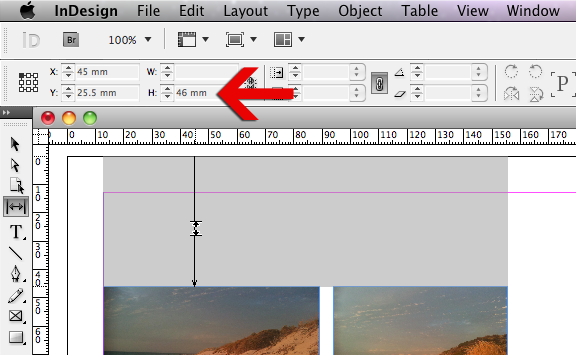
I can’t help but feel a little excited about this find, because it has so many uses! For instance:
- You need to convert a design from a graphic designer into a template, and the designer didn’t use any guides, margins nothing. Use the Gap Tool to quickly measure the top, bottom, left and right most margins, by hovering above, to the right, bottom and left of objects. With those details dotted down you can create a master page for the template.
- Want to measure how far objects are apart, so that you can set the gap information on a multiple column frame? Or design a column based grid? Click between the objects.
Nice right? 🙂
Hi Yahiko, you won’t be able to do that using the Gap tool dynamically, however, if you select objects that need to be distributed a distance you can use the Align Panel in InDesign. Also Utilities > Script, there is a script that makes a Grid of frames.
Dear Mrs. Cari…
I can’t figure out how to type measurement value between two object while i use the gap tool. Can u help me… Thanks for attention…
@marijan:
I was thinking just the same thing 🙂 because currently you need to really look at the measurement value as you drag the gap width.
I am putting in a feature request with Adobe for that option using the wishform on the Adobe site 🙂 https://www.adobe.com/cfusion/mmform/index.cfm?name=wishform
Cari
@Tim:
the pleasure’s all mine 🙂 thank you for the wonderful find! I can see some great future potential for the Gap Tool 🙂
Cari
Hi Cari,
thank you very much for mentioning me on your Blog. It’s much appreciated!
Regards,
Tim
Yes, if you don’t look at Control Palette you will not notice it definitely! 😀
It would be awesome to be able to select gap between objects with Gap Tool (U) and type desired value for distance! 🙂
@Erica 🙂 I have to admit I hadn’t noticed it either, until Tim pointed it out in his tip on his blog. Great find by him I reckon!
I had never noticed that, either…thanks for the great tip, Cari!